
Room 01 · AI Camp · Free
The Claude Course for Late Starters
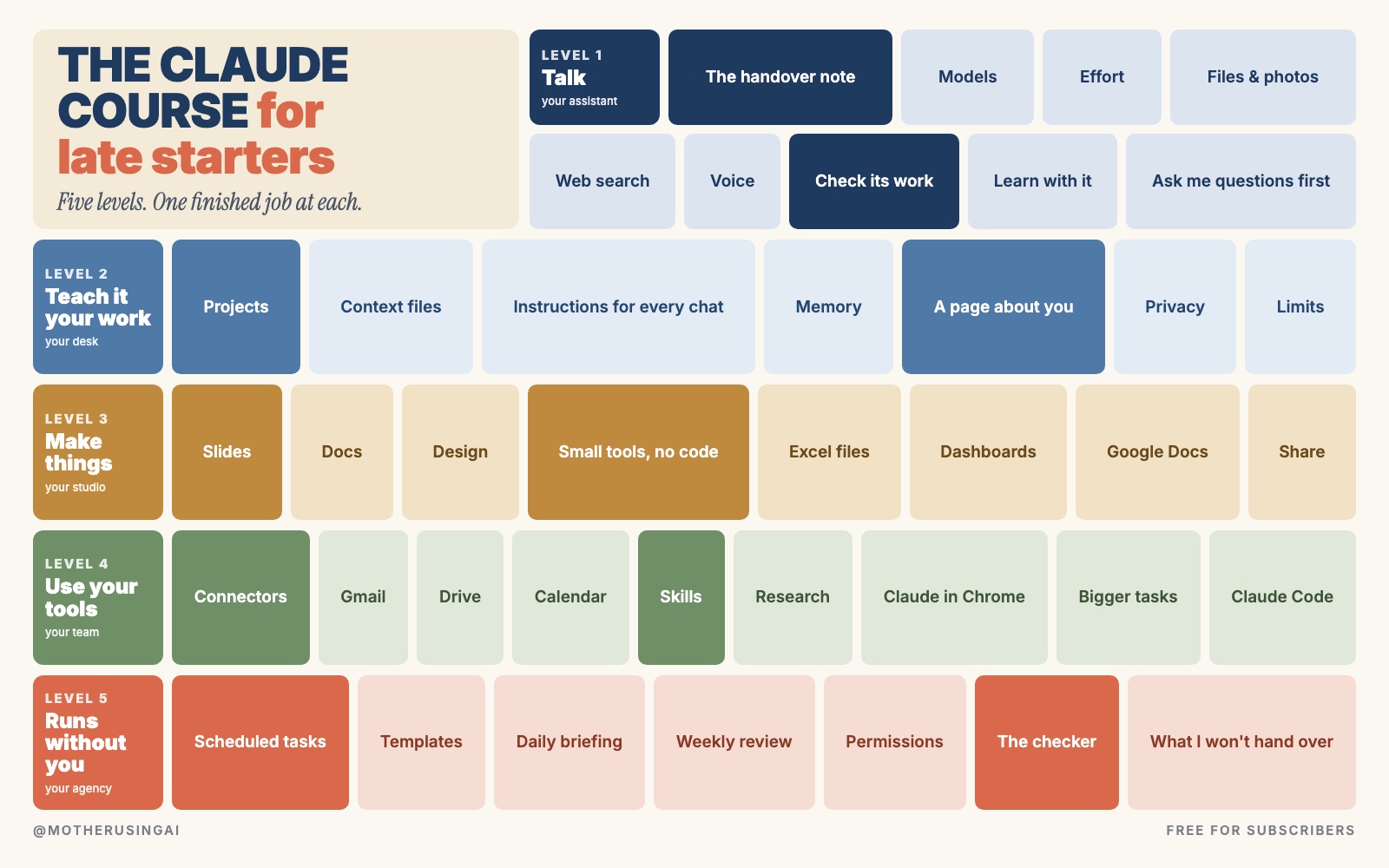
This course is the map. Five levels, in the order I would learn them again. Each level ends with one real job finished, so you finish with things you have done.
You are not a CEO.
You never had an assistant to plan your week, an editor to read your drafts, a lawyer to read the small print, or a junior to build the little tool you keep wishing existed.
People with money had all of them, for everything they did.
Claude can do a piece of each of those jobs now. Most of it is free. The hard part is knowing where to begin, and what to ignore.
This course is the map. Five levels, in the order I would learn them again. Each level ends with one real job finished, so you finish with things you have done.
Every screenshot is a real result. I tested each level in Claude in October 2026, and I tell you where it went wrong as well. Where Anthropic has its own guide for a feature, the link is under that section, so you can always check the latest version.
How to use this course
Do one level a week. Inside each level, do the jobs in order. Each one ends with a line that starts with Done when. If you can say yes to it, move on. If you can't, do that job again with your own work.
What is here, and what is in the letters
This course is the map: where every part of Claude is, what it is for, and a first job to do with it. The full systems behind each level (the prompts I use every week, the files to copy, the packs for different jobs) are in my letters for paid subscribers. Each level links to the one that goes deeper.
Before you start: which plan
Open claude.ai or the Claude app on your phone and make a free account. That is enough for levels 1 to 4.
| Plan | Price | What it adds |
|---|---|---|
| Free | $0 | Chat, web search, files, memory, connected apps, small tools, Slides, Docs and Design, up to 5 projects |
| Pro | $17 a month billed yearly, or $20 month to month | More use, more models, Research, tasks that run on a schedule, Claude in Chrome, Claude Code |
| Max | from $100 a month | For people who use it all day. You do not need it for this course |
Prices and features are from claude.com/pricing in October 2026.
Start free. Upgrade when a job you actually want needs it, not before.
Level 1 · Talk to it
Your assistant. The first level is learning to hand Claude a whole job.
1. The handover note
Hand Claude a job. A job written down properly comes back finished. It takes four lines: what you want, what you have, who it is for, and how you will know it is done.
It is what you would leave a colleague covering your desk for a day.
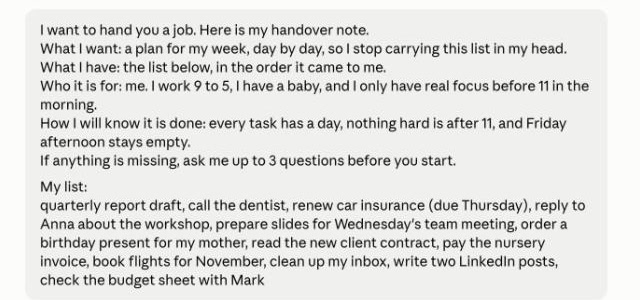
My job was a list I had been carrying in my head: twelve tasks, a baby, and real focus only before 11 in the morning.
I want to hand you a job. Here is my handover note.
What I want: [the finished thing, in one sentence]
What I have: [paste your list, notes, or the old version]
Who it is for: [the person who reads it, and one thing about them]
How I will know it is done: [two or three things that must be true]
If anything is missing, ask me up to 3 questions before you start.

[paste your material here]
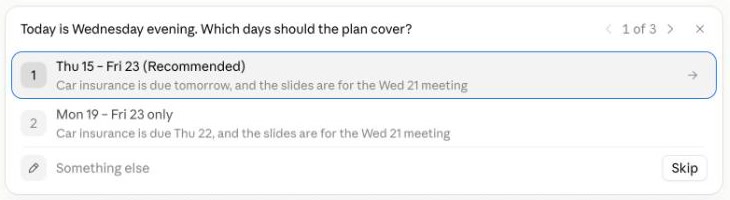
It did not start writing. It asked three questions first, each one with buttons to click.
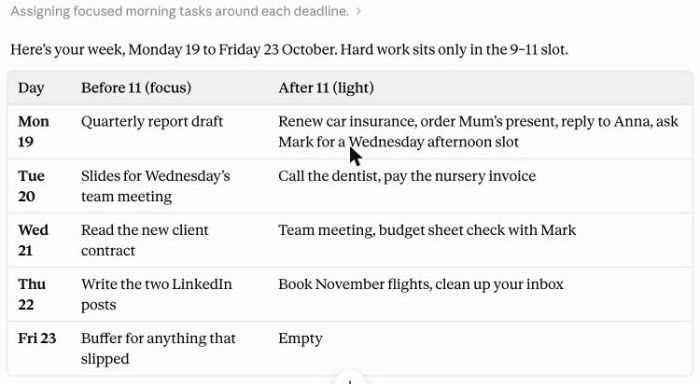
It moved the car insurance to Monday, three days before it was due, "which leaves three days of room if the insurer is slow". And it warned me that an early Wednesday meeting would eat into my contract reading, and told me which day to swap.
That warning came from the fourth line of the note. When Claude knows what done looks like, it checks its own plan against it.
Done when: you have handed Claude one job you were avoiding this week, and used what came back.
2. Pick the model and how hard it thinks
Under the box where you type, click the model name.
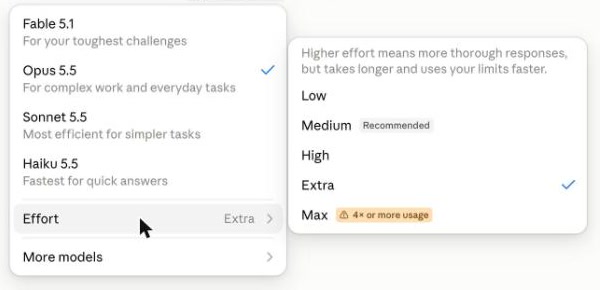
The menu says it plainly: higher effort means more thorough answers, but it takes longer and uses your limits faster. On the free plan you may see fewer choices here.
My rule:
- A quick question, a rewrite, a list: the default is fine.
- A plan, a decision, anything with numbers or a deadline: turn the effort up, or pick the stronger model.
Done when: you have asked the same job twice, once on the default and once with more effort, and you can tell the difference.
Official guide: Change the model, effort, and thinking settings
3. Web search, thinking harder, or Research
Claude has three ways to go further than its first answer. Anthropic's own guide puts it like this:
- Web search for quick facts that may have changed: a company, today's news, opening hours. One or two searches.
- Thinking harder (the effort setting from job 2) for a hard problem that needs no web: a budget, a decision, a plan with many parts.
- Research (plus menu, paid plans) for a real report: five or more searches over a few minutes, from the web and your connected apps.
Search the web for what changed in [your field or tool] in the last 30 days. Give me 3 points, each with the link, and tell me which one matters for someone who [your job].
Done when: you have used web search once for something you would have googled, and opened the links it gave.
Official guide: When should I use web search, extended thinking, and research?
4. Give it your files and photos
Pasting text works until the document is long. Click the plus sign under the box, then "Add files or photos".
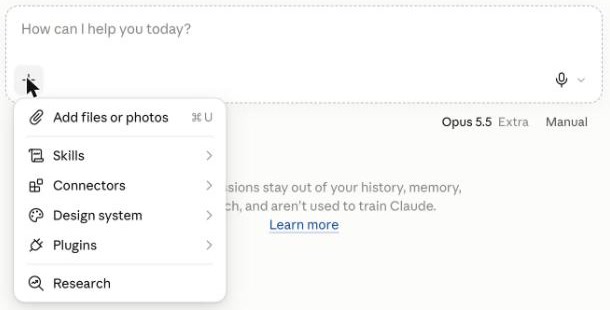
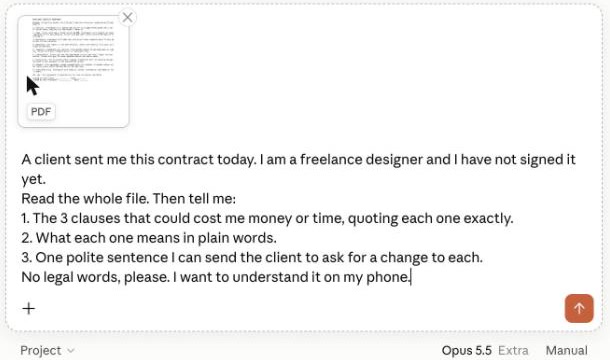
I gave it a two-page freelance contract that I wrote for this test, with a few traps in it.
A client sent me this contract today. I am a [your job] and I have not signed it yet.
Read the whole file. Then tell me:
1. The 3 clauses that could cost me money or time, quoting each one exactly.
2. What each one means in plain words.
3. One polite sentence I can send the client to ask for a change to each.
No legal words, please. I want to understand it on my phone.
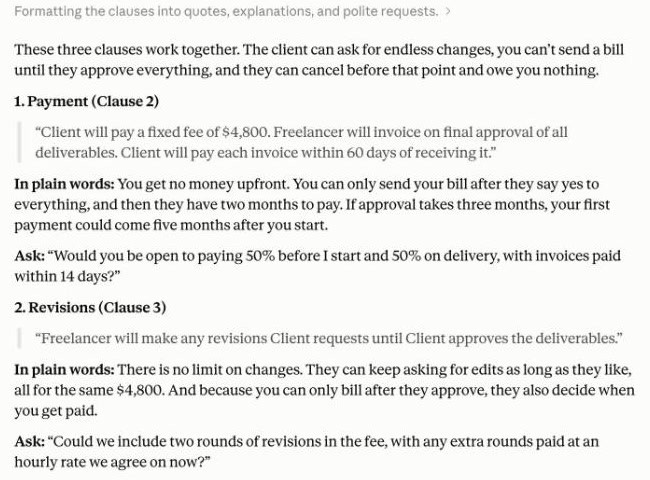
It quoted each clause word for word, so I could check it against the file, and finished with: "I'm not a lawyer, so if anything here worries you, it's worth a quick check with one before you sign."
The same prompt works for a lease, a job offer, a school policy, an insurance letter. Change the first line. A photo works too: a letter from the bank, a form, a broken thing.
Done when: you have given Claude one document you signed without reading properly, and you understand it now.
Official guide: Upload files to Claude
5. Make it check its own work
Claude will rarely tell you which part of an answer it guessed. It sounds just as sure about the guess as about the fact.
Start with one habit. Before you send anything with names, dates or numbers in it, ask under the answer:
Which parts of this did you guess?
When I tested this properly, on three everyday jobs, ChatGPT had invented a team in a meeting email, and none of five real studies it found for a manager showed what I had asked. The four questions that caught all of it, and a Claude project that asks them every time, are in this letter: I Made ChatGPT and Claude Check Their Own Work.
Done when: you have run the check on one answer you were about to use, and fixed what it found.
6. Learn with it
Claude can teach you something step by step, one question at a time. Paste this in any chat:
I want to finally understand [topic]. Don't give me the answer.
Ask me one question at a time, wait for my reply, and only move on when I have got it.
There is also a ready-made skill for this from Anthropic, called "learn". You will install it in level 4.
Done when: you have learned one thing from your own work this way, in under twenty minutes.
7. Talk to it on your phone
Voice mode lets you talk to Claude and hear it answer. It is in beta on every plan, on the phone, desktop and web, and it is built to work best on your phone. Tap the sound-wave symbol next to the box.
It is the version for when your hands are busy. Try this on your next walk:
I'm going to talk through my week out loud. Let me finish, then ask me two questions, then give me the plan in five lines.
Done when: you have had one spoken conversation with Claude and used what came out of it.
Official guide: Use voice mode
The rest is free. Sign in to keep going.
Subscribe free on Substack, then sign in here with the same email.
- ●Level 2 · Teach it your work
- ●Level 3 · Make things
- ●Level 4 · Let it use your tools
- ●Level 5 · Let it run without you